
Homes
If your server has homes turned on, you can save places in game and teleport back to them from Discord.
Before you start
Commands
| Command | What it does |
|---|---|
/home set name: | Saves where you're standing now. Using a name you already have moves that home here. |
/home go name: | Teleports you there. You must be in the game. |
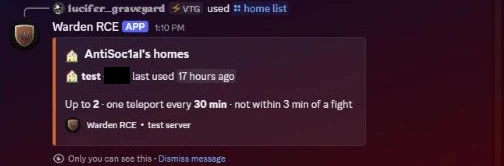
/home list | Your homes, their map squares and when you last used them. |
/home remove name: | Deletes a home. |
Homes belong to one game server. If your Discord has several, Warden uses the one you're playing on right now; when you're offline, pick one with server:.
The rules
Each server sets its own; /home list shows them:
- how many homes you can have
- how long between teleports
- no teleporting for a few minutes after a PvP kill or death
- sometimes a price per teleport, taken from your wallet
- where a home can be set: anywhere, only near a tool cupboard, or only inside your own team's protected base
You can never set a home inside another team's protected base.