
Adding Warden to your Discord
You need the Manage Server permission in a Discord to add a bot to it.
- Open wardenrce.com/invite (or the Add to Discord button at the top of this page).
- Pick your Discord from the list and press Continue.
- Leave every permission ticked and press Authorize.
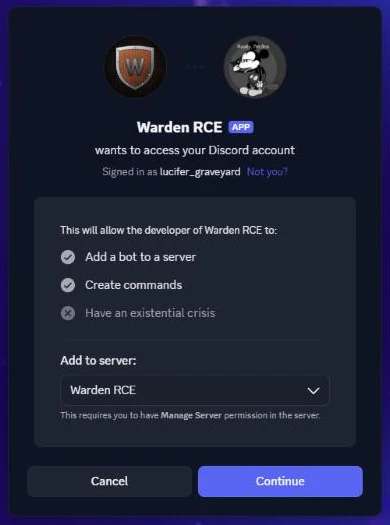
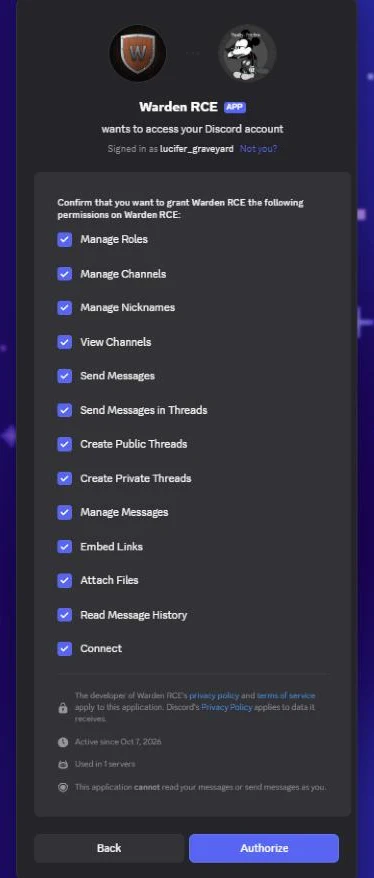
Warden shows up in your member list as Warden | RCE Bot. Type / in any channel and you'll see its commands.
The permissions it asks for
| Permission | Why |
|---|---|
| View Channels, Send Messages, Embed Links | Posting feeds and answering commands |
| Read Message History | Ticket transcripts |
| Attach Files | Backups, kit codes and transcripts as files |
| Manage Channels | /setup makes your feed channels; the online-count channel is renamed with the player count; ticket channels |
| Manage Roles | The Linked role, clan and rank roles, and channel permissions |
| Move Members | Join-to-create voice channels: moving people into their new channel, and out of it when its owner kicks them |
| Manage Nicknames | Only used if you turn on gamertag nicknames (Linked role) |
| Manage Messages, Connect, Create Public / Private Threads, Send Messages in Threads | Warden never uses these itself - it sets them in channel permissions (staff can tidy a ticket; nobody can talk in a feed channel or join the online-count channel), and Discord only lets a bot set permissions it has |
Warden doesn't ask for Administrator, Kick, Ban or anything to do with your members' accounts.
Careful If Warden was added before (with fewer permissions), open the invite link again and authorize it on the same Discord - it updates Warden's permissions and keeps every setting. Or add the missing ones to Warden's role under Server Settings → Roles.
Warden's role position
Discord only lets a bot give out roles that sit below its own role. If you want Warden to hand out the Linked role or clan roles, drag the Warden RCE role above them in Server Settings → Roles.
Who can use the admin commands
Admin commands (setting up servers, feeds, the economy...) need Manage Server. Moderation commands also work with Kick Members or Ban Members. To let a role use staff commands like /kick, /giveaway or /say without Manage Server, give it a staff role.
Next: connect your game server.