
The shop (premium)
Players browse and buy with /shop view in Discord; what they buy is delivered in game straight away. The economy needs to be set up - adding the first item does that for you if it isn't.
What you can sell
| Command | Sells |
|---|---|
/shop add-item game_item: amount: price: | A stack of one item - start typing and pick from 540+ items checked on a real server |
/shop add-kit kit: price: | A kit that's on your game server |
/shop add-teleport location: price: | A teleport to a monument or one of your places - see Teleports |
/shop add-group group: price: | A command group - anything console commands can do, run for the buyer |
/shop add-vehicle vehicle: price: | A vehicle that spawns right next to the buyer - see Vehicles |
/shop add-role role: price: hours: | A Discord role - for good, or for hours (it's taken back when the time is up) |
/shop add-vip price: hours: all_servers: vip_role: | In-game VIP for hours (or for good), on this server or all_servers, with an optional Discord role - see VIP |
/shop add-xpboost multiplier: hours: price: | A personal battle pass XP boost (1.5x to 3x) for the buyer only |
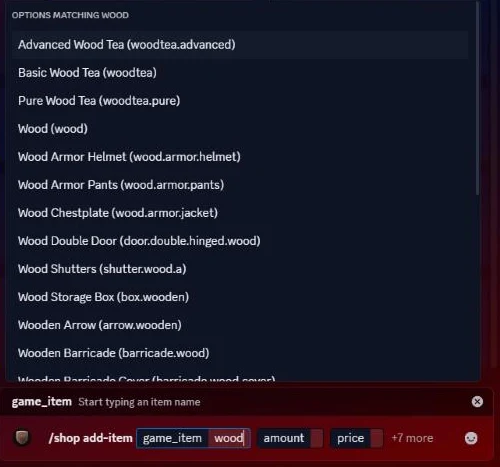
Each one also takes:
| Option | What it does |
|---|---|
category | Which category it shows in |
name | The name in the shop (a sensible one is made if you leave it out) |
position | Order in its category - 0 is first |
cooldown | Minutes before the same player can buy it again |
game_role | Only players with exactly this in-game role (VIP, Moderator, Admin, Owner, or User = no special role) |
discord_role | Only linked players with this Discord role |
With both locks set, either one is enough. Locked items still show, marked as locked.
Categories
Discord menus hold 25 entries, so the shop is organised into categories:
/shop category add name:- e.g. Kits, Weapons, Resources/shop category edit,/shop category list/shop category delete- deletes the category and every item in it
Changing items
/shop edit item:- price, amount, name, category, order or cooldown/shop edit item: price_rise:10 price_cap:50- a price that rises when busy: each sale in the last day adds 10%, up to 50% over the price, and it drops back as sales age past a day. Good for scarce things like rockets or C4.price_rise:0makes it a fixed price again. The shop shows the price players pay right now./shop lock item:- set or clear the role locks/shop remove item:- stop selling it
On the dashboard's Shop tab you can drag items between categories, and tick several items (or a whole category, or Select all) to change their prices by a percent - a 20% sale is -20 - set their cooldown, move them to another category or remove them together.
Shop files
Save a shop as a file and load it anywhere - a backup before a big change, a shop you built on one server copied to another, or one shared with a friend's Discord.
/shop export- Warden sends you the shop as a.jsonfile: categories, items, prices, cooldowns, locks, and the command groups items run./shop import file: mode:- load one.modeis Add to the shop (default) or Replace the shop. Warden first shows what would change - how many items, new categories and command groups, and anything left out - and nothing happens until you press Load it.
The dashboard's Shop tab has the same under Shop file.
What doesn't travel is left out, and listed:
- Teleport items need a teleport place with the same name on the target server.
- Discord roles (role items, Discord-role locks, a VIP item's role) only carry over within the same Discord.
- A category holds 25 items - extras are left out.
- A command group the target already has (same name) is used as it is.
The dashboard's change history can undo a load.
Roles, VIP and XP boosts
These are given in Discord, so buyers don't need to be in game - only linked. Add them with /shop add-role, /shop add-vip and /shop add-xpboost, or on the dashboard's Shop tab (Sell something → Discord role, VIP or XP boost).
- Roles: Warden needs Manage Roles, and its own role has to be above the role it sells (Server Settings → Roles). Buying a timed role again adds the time on.
- VIP: works like timed VIP - buying again adds the time on, and Warden never demotes a Moderator or Admin.
- XP boosts: the buyer's battle pass XP is multiplied for the time they bought. A server-wide double XP and a personal boost don't stack - the bigger one counts. A new boost replaces the one running. The battle pass has to be on.
Cooldowns
Each item's cooldown is how long a player waits before buying it again. To let someone use it again early:
/cooldowns list(user:orgamertag:for one player) shows every wait running now - on shop items, emote kits and timed kits./cooldowns resetclears waits: everyone's, one player's (user:/gamertag:), one kind (what:) or one thing (item:). The cooldown settings stay as they are - only the current waits go.
The dashboard's Rewards tab lists every wait too, with a Clear button on each - or clear one player's, or everyone's. Resets are posted in your admin alerts. Give moderators /cooldowns with a staff role.
The basket
Players can buy several things in one go:
- In a category, the item menu takes several picks - pick one to buy it straight away, or several to put them all in the basket.
- Add to basket sits next to Buy on any item.
- The basket shows everything with the total and the player's balance. One more of... and One less of... change the amounts; Buy all buys the lot.
Each thing is bought exactly as if it were bought on its own - locks, cooldowns and refunds work the same - and the receipt says what arrived and what didn't (nothing is charged for those). If the total is more than the player has, nothing is bought.
Limits: up to 10 of one thing and 30 things in all, and one vehicle and one teleport per order (two vehicles would land on top of each other). Baskets are kept for 30 minutes, and are lost if Warden restarts.
Vehicles
/shop add-vehicle sells a vehicle that appears a few metres from the buyer. Every vehicle on the list was spawned for real on a Console Edition server:
Minicopter, Scrap Transport Helicopter, Attack Helicopter, Hot Air Balloon, Rowboat, RHIB, Kayak, Solo Submarine, Duo Submarine, Horse, 2-, 3- and 4-Module Car, Snowmobile, Motorbike and Pedal Bike.
- The buyer needs to be in game - Warden looks up where they stand. If it can't find them, nothing is charged.
- Boats and submarines appear beside the buyer too, so tell players to stand at the water's edge before buying one.
- The Tugboat and the Sedan aren't on Console Edition, so they can't be sold.
The dashboard's Shop tab has the same list under Vehicle.
What players need
To buy, players must be linked and online. Vehicles and anything using their position arrive where they stand. If delivery fails, they get their money back automatically.