
One-command setup: /setup
/setup gets a Discord ready in one go. Run it after connecting your server (or press Set up channels on the success message).
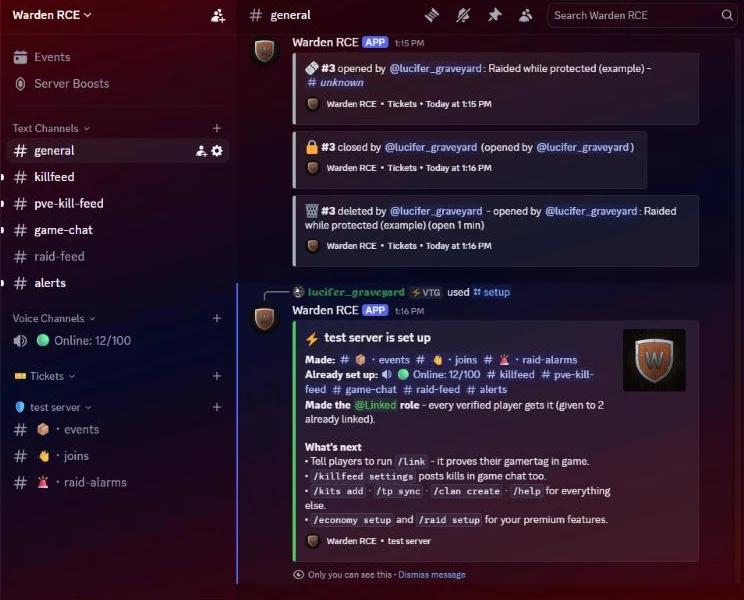
What it makes
For each game server, a category named after it with:
| Channel | What goes there |
|---|---|
| Voice channel | Its name shows the player count, e.g. 🟢 Online: 12/50 (queue in brackets, 🔴 Offline when the server is down) |
| 📊・server-status | The live status card - online or not, players, the last and next wipe. Kept up to date by itself |
| ⚔️・kill-feed | Players killing players, with K/D |
| 🎯・pve-feed | Scientists, helicopters, Bradley, traps |
| 📦・events | Airdrops, cargo ship, patrol heli and more |
| 👋・joins | Players joining and leaving |
| 💬・game-chat | Global quick chat, notes and /say |
| 🚨・raid-alarms | Players' raid alarms going off |
| 🛡️・raid-protection | Bases protected and unprotected - premium servers only |
Plus, once per Discord:
- 🚨・admin-alerts - a channel only admins can see, for admin alerts.
- 🚩・player-warnings - hidden too: other server owners' warnings about players, and heads-ups when a warned player joins.
- 📋・raid-log - premium servers, hidden: the raid protection log - every base bubble change and why.
- A green Linked role, given to every player who links their gamertag.
Feed channels are read-only for players - only Warden posts in them.
/setup is safe to run again. Channels that still exist are kept; only missing ones are made. Rename or move the channels however you like afterwards.Doing it by hand instead
If you'd rather use your own channels, point each feed at one with /feed set - see Feeds.
Several servers in the same channels
With more than one game server you don't need a category each. After /server add, press **Share name's channels instead of Set up channels**, or for a server that already has its own:
/server merge server:Solo into:MainSolo then posts in Main's channels - every post says which server it's from - and its live status card sits next to Main's in the status channel. Each server keeps its own player-count voice channel, named after it (🟢 Main: 12/50, 🟢 Solo: 3/20). Warden shows what it will move and delete before you press Merge, and only deletes channels it made itself.
Removing the channels
/server cleanup server:MainDeletes the channels /setup made for that server (and its category, if nothing else is left in it) and stops its feeds. The game server stays connected with all its settings, stats and money - run /setup to make the channels again. Add discord_wide:True to also delete the admin-alerts and player-warnings channels and the Linked role.
Both are also on the dashboard's Connection & channels tab. Warden lists exactly what goes before you press Delete them. Channels you picked yourself with /feed set, and channels another server still uses, are only unhooked - never deleted.
Copying a server's setup
Got a second server? Set the first one up, then copy it: /server copy from:Main to:Second, pick what to copy from the menu and press Copy. On the dashboard it's on the Tools tab.
| You can copy | Ticked to start with |
|---|---|
| Settings and modules (economy rates, kill feed, raid protection, homes, bounties, airdrops, games...) | ✅ |
| The shop, timers, command groups | ✅ |
| Emote and auto kits, the battle pass track | ✅ |
| Feed colours | ✅ |
| Rewards: the daily streak track, loot crates, timed drops, in-game giveaways | ✅ |
| Dial & Ride | ✅ |
| Restarts and wipes: daily restart times, what a wipe resets and announces | ✅ |
| Kits on the game server: the kits themselves, with their items (both servers online; kits it already has are kept) | ✅ |
| Feed channels (shared): its feeds go into the same channels, each post headed with its server's name | - |
| Teleport places (only if both servers use the same map) | - |
| Zones, portals and the prison (only if both servers use the same map) | - |
- What you pick replaces the other server's own. What you leave unticked stays as it is.
- Players' wallets, stats, homes, bases, bans, crate keys and streaks never move.
- Copied zones and portals are made in game straight away, and the other server's old ones are removed. If it's offline, they're made when it reconnects.
- The kits themselves live on the game server, and Kits on the game server copies them over the game's console after the rest - your admin alerts say when it's done.
/kits copydoes just the kits, any time. - Not copied: things that are one server's own, like its Tip4Serv store, server listing, status card, leaderboard channels and votes.
What next
The dashboard's Feeds tab shows a Getting started checklist until your server is fully set up - each step has a button that does it or takes you there. In Discord, /checklist shows the same, and says what's wrong if something breaks later.
- Ask your players to link their gamertags.
- Turn on the in-game kill feed.
- Look through modules to see what else you can switch on.