
Welcome to Warden RCE
Warden RCE is a Discord bot for Rust Console Edition community servers. It connects to your game server over RCON - the same remote console your host's panel uses - and brings the server into your Discord: kill feeds, linked accounts, stats, an economy and shop, raid protection, moderation and more.
This guide has two halves:
- Players' guide - for people who play on a server that uses Warden: linking your gamertag, checking stats, spending money, homes, raid alarms, clans.
- Owners' guide - everything else: adding Warden to your Discord, connecting your server, and setting up each feature.
What Warden does
| Area | What you get |
|---|---|
| Feeds | PvP and PvE kill feeds with K/D, events (airdrops, cargo, heli, Bradley), joins and leaves, an online-count channel, in-game chat in Discord |
| Players | Verified gamertag linking, stats, leaderboards, clans with a [TAG] in the kill feed |
| In game | A kill feed in game chat with your own colours and wording, emote kits, teleports, homes, timed announcements |
| Moderation | Kick, ban (one server or all of them, for good or for a while), an admin alert channel |
| Economy (premium) | Players earn from kills, playtime and a daily bonus, then spend it in a Discord shop - kits, items, teleports, anything a console command can do |
| Bases | Raid protection while a team is offline (premium), raid alarms by DM, bounties (premium) |
| Support | A ticket button that opens a private channel with your staff |
Items marked (premium) need premium. Everything else is free. See Premium.
How it connects
Warden only needs three things from your host: the server's IP, its RCON port and the RCON password. It never needs your G-Portal or Nitrado login. On G-Portal and Nitrado you can skip typing them: give Warden's account access to your server and it reads them itself - see Connecting your game server. The password is stored encrypted and never shown again.
Commands
Everything is done with Discord slash commands - type / in your Discord and pick a Warden command.
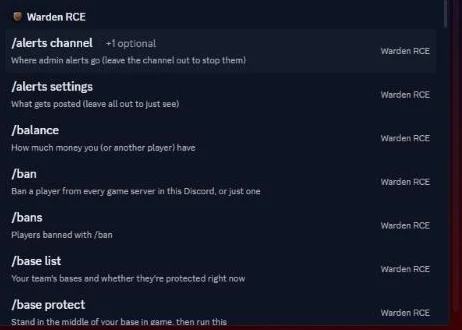
/help lists them in Discord, and Every command lists them all here. Admins can also use the web dashboard.