
Switching features on and off
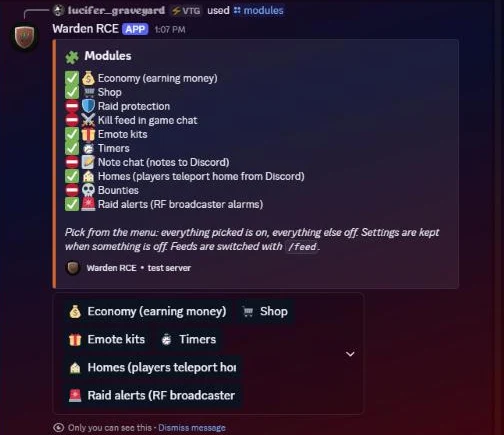
/modules shows every feature for a game server, with a menu to switch them. Everything you pick is on, everything else is off.
| Module | Notes |
|---|---|
| Economy (premium) | Players earning money. Needs /economy setup first. |
| Shop (premium) | The Discord shop. The economy keeps running when the shop is closed. |
| Raid protection (premium) | Needs /raid setup first. Turning it off switches every bubble off in game. |
| Kill feed in game chat | See in-game kill feed |
| Emote kits | Quick chat phrases giving kits |
| Emote kit replies in game chat | Tells a player when a kit is on cooldown or needs a role - see Emote kits |
| Timers | Announcements and commands every few minutes or at set times |
| Note chat | Notes to Discord - players still opt in themselves |
| Homes | Off until you turn it on - see Homes |
| Bounties (premium) | Off until you turn it on - needs the economy |
| Spin, blackjack, bank, drops and steal on kill (premium) | See Games - needs the economy |
| Battle pass (premium) | See Battle pass |
| Skip Night votes | See Skip Night |
| Random items game mode (premium) | See Random items |
| Airdrops (premium) | See Airdrops |
| Cargo Ship harbour stop (premium) | Only does something once you pick a mode - see Cargo Ship at a harbour |
| Portals (premium) | See Portals |
| Dial & Ride (premium) | See Dial & Ride |
| Raid alerts | Players' raid alarms |
| Rank sync | Leave a game server out of rank sync |
- Needs setting up first - the menu says which command.
- Marked (premium): on a free server it needs premium.
- Switching off never deletes anything. Kits, shop items, bases and settings all come back when you switch it on again.
Feeds aren't modules - turn those off with /feed remove.