
Earning and spending money
On servers with an economy (premium) you earn money while you play and spend it in a shop in Discord. The server picks the name of the money - often Scrap.
Earning
How much you get is up to the server; /economy settings shows admins the numbers. Usually:
- every player you kill
- every scientist or NPC you kill
- every half hour online
/dailyonce a day- sometimes a welcome bonus when you first join, and a reward for linking
You start earning before you link - your money is kept under your gamertag.
Checking your money
/balance shows your wallet. /daily claims the daily bonus - on servers with a daily streak, each day in a row pays more (and /daily tells you what tomorrow brings). Miss more than 48 hours and the streak starts over.
/pay amount: user: (or gamertag:) sends some of your money to another player - add a note: to say what it's for, and they get a DM. It's instant, so double-check who you're paying.
With a shared wallet (the usual) your money is the same on every server, so /pay and /balance don't ask which one. With per-server wallets pick the server: - you can only send what you have on that server.
Buying from the shop
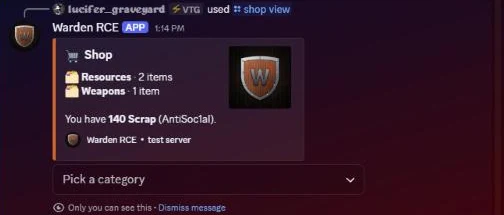
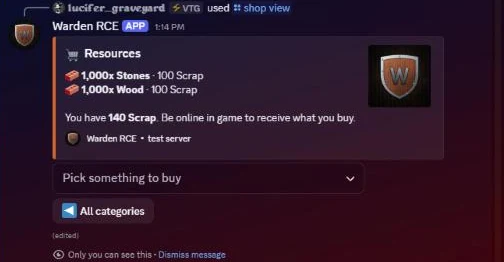
- Link your gamertag and be in the game.
- Run
/shop view. - Pick a category, then an item, then press Buy.
- It's delivered to you in game straight away.
Buying several things? Pick more than one in the item menu (or press Add to basket), then open the 🧺 Basket and press Buy all. You get a receipt saying what arrived.
- If something goes wrong delivering it, you get your money back automatically.
- Some items have a cooldown before you can buy them again, and some are locked to a role, like VIP.
- Vehicles and some special items arrive where you stand, so be in the game when you buy. If Warden can't find you, nothing is charged.