
Stats and leaderboards
Your stats
/stats shows your kills, deaths, K/D, kill streaks, NPC kills (PvE) and playtime on the server as a picture card you can share. Once you've linked, just run it without options.
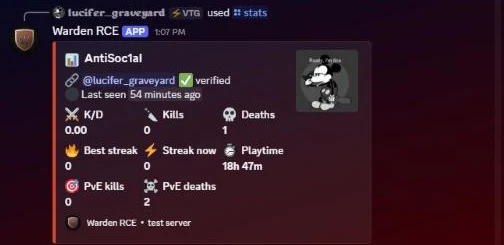
/stats gamertag:- anyone's stats.- Stats are per game server. If your Discord has several, add
server:.
Leaderboards
/leaderboard type: shows the top 10 this wipe:
| Type | Ranked by |
|---|---|
| PvP kills | Players killed |
| K/D | Kills per death (players with 5 or more kills) |
| NPC kills (PvE) | Scientists and other NPCs killed (the game doesn't report animal kills) |
| PvP deaths | Times killed by a player |
| Deaths to NPCs, animals and traps | Times killed by scientists, bears, spikes, shock locks and the like |
| Best kill streak | Most PvP kills in a row without dying - on one server; a streak doesn't carry over between servers |
| Playtime | Time on the server |
| New this wipe | Playtime of players who weren't on the server in an earlier wipe |
| Richest | Wallet balance (servers with an economy) |
| Clans | PvP kills of each clan, not counting kills of their own members |
Add all_servers:True to rank everyone across every game server in your Discord, added together - a player on two of your servers is ranked on their total.
Leaderboards in a channel
/leaderboard-channel set channel:#leaderboardsPosts the leaderboards in one message and keeps it up to date - nobody has to run a command. Admins only.
| Option | What it does | Default |
|---|---|---|
show | Everything, PvP (kills, K/D, deaths, kill streaks, clans), PvE (NPC kills, deaths to NPCs, animals and traps) or Activity (playtime, new players, richest) | Everything |
types | Or your own list: kills, kd, deaths, streak, pve, npcdeaths, playtime, rookies, balance, clans | |
refresh | Every hour, every 6 hours or every day | Every hour |
server | One game server - leave it out for every server in your Discord, added together | All |
- Run it again on the same channel to change it.
- If someone deletes the message, Warden posts it again. If the channel is deleted, the leaderboard stops and your admin alerts say so.
/leaderboard-channel listshows them all;/leaderboard-channel removestops one and deletes its message. Up to 10 per Discord.
Who's online
/status shows the players online, the server's uptime and the in-game time.
On the website
Anyone can look a player up at stats.wardenrce.com, or with /lookup gamertag: in Discord: every server running Warden they've played on, with K/D, kills, deaths and playtime on each - this wipe, past wipes and all time - plus overall totals, kill streaks, who their nemesis is, how they died, who they team with, Xbox or PlayStation, and when they were last seen. The site also has a page for every server (with a player-count graph) and global leaderboards for K/D, kills, deaths, NPC kills and playtime.
/lookup on its own shows your own profile. Looking up another @member is for admins only - which gamertag someone plays as stays private.
It's by gamertag only - it never shows who you are on Discord. It never shows whether you're online right now or what time of day you usually play. When a server wipes its stats, your numbers for the wipe that ended are kept, so your all-time totals keep counting.
Hiding your stats
Don't want your gamertag on the public stats? Hide it:
/privacy public_stats:Hide meYou need to be linked first - that's how Warden knows the gamertag is yours. Once hidden:
- Your profile on the stats site and
/lookupsays your stats are private. - You're left off the global leaderboards, every server page (top players and who's online), and other players' nemesis, target and teammate lists.
- It counts for every Discord running Warden, not just the one you ran it in.
- You can still
/lookupyourself - only you see the reply.
The Discord you play in still shows you in its own /stats, leaderboards and kill feed. Those are part of that server, not the public site.
/privacy on its own shows what's set. /privacy public_stats:Show me puts you back.