
Kicks and bans
Kick and ban players from Discord, on one game server or all of them at once. Using these commands needs Kick Members / Ban Members (or Manage Server) - or a staff role that has them.
/ban (for banning Discord members). When you type /ban, pick the one with Warden RCE's shield - that's the in-game ban.Kick
/kick gamertag: reason:
Kicks the player off whichever of your servers they're on (add server: to pick one). They can rejoin straight away - use a ban to keep them out. Start typing the gamertag and pick from the players online.
Ban
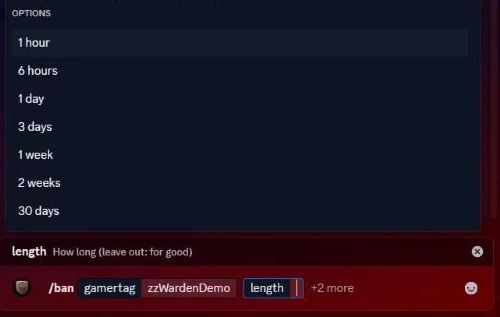
/ban gamertag: length: reason: server: public_reason:
| Option | What it does |
|---|---|
gamertag | Start typing - anyone seen on your servers. Gamertags with spaces work. |
length | 1 hour, 6 hours, 1 day, 3 days, 1 week, 2 weeks or 30 days. Leave it out to ban for good. |
reason | Kept in the ban list and shown in admin alerts |
server | Only this server. Leave it out to ban from every server in this Discord - including servers you add later. |
public_reason | Cheating, Exploiting, Griefing, Toxicity, Ban evasion or Other - shown on the player's stats page, if your server shows bans there. Leave it out and the ban stays private. |
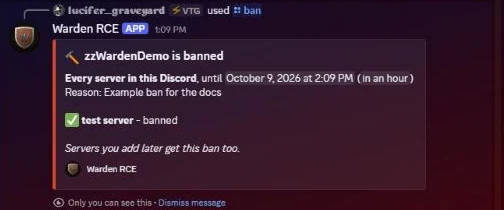
What happens:
- The ban goes onto each game server's own ban list. For timed bans the game shows the player when it ends, and lifts it by itself.
- If they're online, they're kicked.
- A server that's offline gets the ban as soon as it's back.
- If a banned player still manages to get in, Warden kicks them and tells your admin alerts.
Bans on the stats site
You can show your bans on players' pages on stats.wardenrce.com - so other servers and players can see who was banned for cheating. It's off until you turn on Show bans on player pages in the dashboard's Server listing tab.
- Only bans with a
public_reasonare shown, and only that reason - never what you typed inreason, and never who banned them. - The page says which server, since when and until when. Lifted or run out, it's gone.
- If your listing has a Discord invite, the page links to it so the player can ask you about it.
Unban
/unban gamertag: lifts every /ban on that player, on every server it covers. Timed bans end by themselves - Warden then checks each server's ban list to make sure they're really off it, and says so in your admin alerts.
The ban list
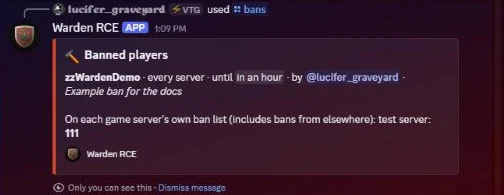
/bans- everyone banned with/ban: where, until when, by whom and why. It also shows how many entries each game server's own ban list has (that includes bans made outside Warden)./bans ended:True- bans that were lifted or ran out.
/unban only lifts Warden's own bans; for others use /run with unban "gamertag", or the Console in your host's panel (on G-Portal: three-line menu → Console). G-Portal has no separate ban list page for Rust Console.Notes and player history
Keep track of players with notes only your staff can see:
/note add gamertag: text:- write one ("warned for toxicity in chat")./note history gamertag:- everything about that player in one list: your notes, their kicks (Warden logs every/kick), their bans, and any warnings you sent other owners. It also says if other Discords have warned about them or ban them./note remove note:- delete a note.
The dashboard's Bans tab has the same thing under Player notes. Notes need Kick Members (or Manage Server), and new ones show up in your admin alerts.