
Feeds
Feeds post what happens on your game server into Discord channels. /setup makes a channel for each; this page is for picking your own.
The feeds
| Feed | What it posts |
|---|---|
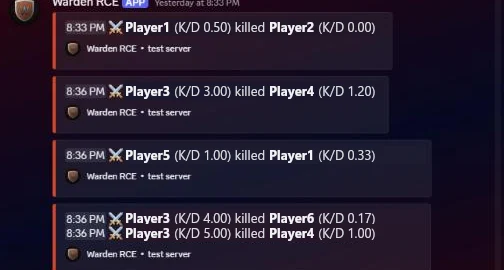
| PvP kill feed | Players killing players, with both players' K/D and clan tags |
| PvE kill feed | Scientists, helicopters, Bradley, traps - kills by or of players |
| Events | Airdrops, cargo ship, Chinook crates, the patrol helicopter (and when it's taken down), Bradley destroyed, oil rig crates being hacked, Halloween and Christmas events |
| Joins | Players joining and leaving |
| In-game chat | Global quick chat, note chat and /say |
| Raid protection (premium) | Bases becoming protected and unprotected (never their position) |
| Raid alerts | Players' raid alarms going off (never their position) |
| Raid protection log (premium) | For staff: every base bubble change, why, and its map square - see the log |
| Online count | Renames a channel (best: a voice channel) to 🟢 Online: 12/50 |
Commands
/feed set type: channel:- send a feed to a channel. Pick a different channel to move it./feed remove type:- stop a feed./feed list- where each feed goes./feed colour type: colour:- the colour down the side of that feed's messages in Discord: a name likeorangeorgold, or a hex code like#ff8800.colour:defaultputs Warden's back. On the dashboard it's the colour square beside each feed on the Feeds tab.
With more than one game server, add server:. Each server has its own feeds, so each can have its own channels.
One channel for several servers
Several servers' feeds can also go into one channel. In a shared channel, each server's posts are headed with its name, like ⚔️ Rusty Dreamz · PvP kills, so you always know which server they're from. A channel only one server uses has no heading, as before.
/feed set type:PvP kill feed channel:#kill-feed all_servers:Trueall_servers:Truepoints that feed of every game server in your Discord at the channel in one go. Run it once for each feed you want combined./feed remove type: all_servers:Truestops that feed for every server.- To combine just some servers, run
/feed setwithserver:for each one and the same channel. - The online count can't be combined, because it renames its channel. Each server needs its own.
- A server added later doesn't join a combined feed by itself. Run the
all_serverscommand again, or/feed set server:for the new one.
Making channels on the dashboard
The dashboard's Feeds tab can make a feed's channel for you and choose who can see it.
- Pick ➕ Make a new channel in a feed's channel list. Warden adds it to that game server's category, with the name
/setupwould give it. - Only Warden can post in a channel it makes, whoever can see it.
- Public - everyone can see the channel.
- Staff only - only your staff roles, dashboard roles and Discord admins can see it. The staff logs start this way.
- You can switch between them at any time. On a channel you picked yourself, Warden asks first, because anything else posted there is hidden or shown too. Only who can see it changes - who can post stays as you set it.
- Warden needs Manage Channels and Manage Roles for this.
Good to know
- Lines are collected for 2 seconds and posted together, so a busy fight is one message, not twenty.
- The online-count channel is renamed at most every 5 minutes, and only when the number changes - Discord only allows two renames per 10 minutes.
- Warden needs View Channel, Send Messages and Embed Links in each feed channel (and Manage Channels for the online count). If a channel is deleted, its feed is removed.
- Team and local quick chat are never posted - they give positions away.
A picture on the posts
/server picture image: (upload a PNG, JPG, WEBP or GIF up to 1 MB) or url: puts your server's picture beside every feed post - your logo, map or banner. Warden keeps its own copy, so it doesn't break when the upload's link runs out.
on_feeds:Falsekeeps the picture but stops showing it;on_feeds:Truebrings it back.remove:Trueremoves it.- A small square picture (256 x 256) looks best - Discord shows it as a thumbnail.
- On the dashboard, the Feeds tab has a Server picture panel: upload one (it's made 256 px for you), paste a link, hide it from the posts, or remove it. For an animated GIF, paste a link - uploads there are turned into a still picture.
Your own kill feed wording
Change how kills read in your Discord kill feed (the in-game one is /killfeed message):
/killfeed discord type:Player kills a player text:🔫 {killer} dropped {victim} ({killer_kills} kills)| Placeholder | Becomes |
|---|---|
{killer} / {victim} | The name, bold, with any clan [TAG] (an NPC reads "a Scientist" in English, and the name in the server's language in others) |
{killer_kd} / {victim_kd} | Their PvP K/D |
{killer_kills} / {victim_deaths} | Their PvP kills / deaths |
{streak} | The killer's current kill streak |
{server} | The game server's name |
Leave text out to see the wording and a preview; reset:True puts the default back. Discord formatting and emoji work.